 avi.dev
Simple Linear Regression ML Model with Swift from scratch
3 min read#Swift#Machine Learning#Linear Regression#Mathematics
That’s a long title over there, and I even squeezed it and wrote ML instead of Machine Learning.
You probably think, “Writing Machine Learning code in Swift? This will probably be a long, tedious academic article”. But you will be surprised to see how simple it is to implement a basic machine-learning code in your app without any libraries!
Simplifying the term Machine Learning
While machine learning algorithms sound scary initially, we can deal with a broad range of complexity levels. A machine-learning algorithm is all about learning from data and answering basic questions. Sometimes, these questions can be straightforward.
This article will focus on an algorithm called Simple Linear Regression. To do that, we’ll start with a simple story.
Starting with studied hours and grades
Our example for today has a data set of students who performed an English exam. For each student, we know the grade they received and the number of hours they studied for the exam. Now, based on this data set, we want to ask the following question: What grade will a student get based on the hours they studied?
Let’s look at the data set:

Our data set contains information about 50 students, so don’t worry, this table is partial! In addition, looking at a table of information doesn’t tell us too much about the data. So, let’s try to visualize it using a graph
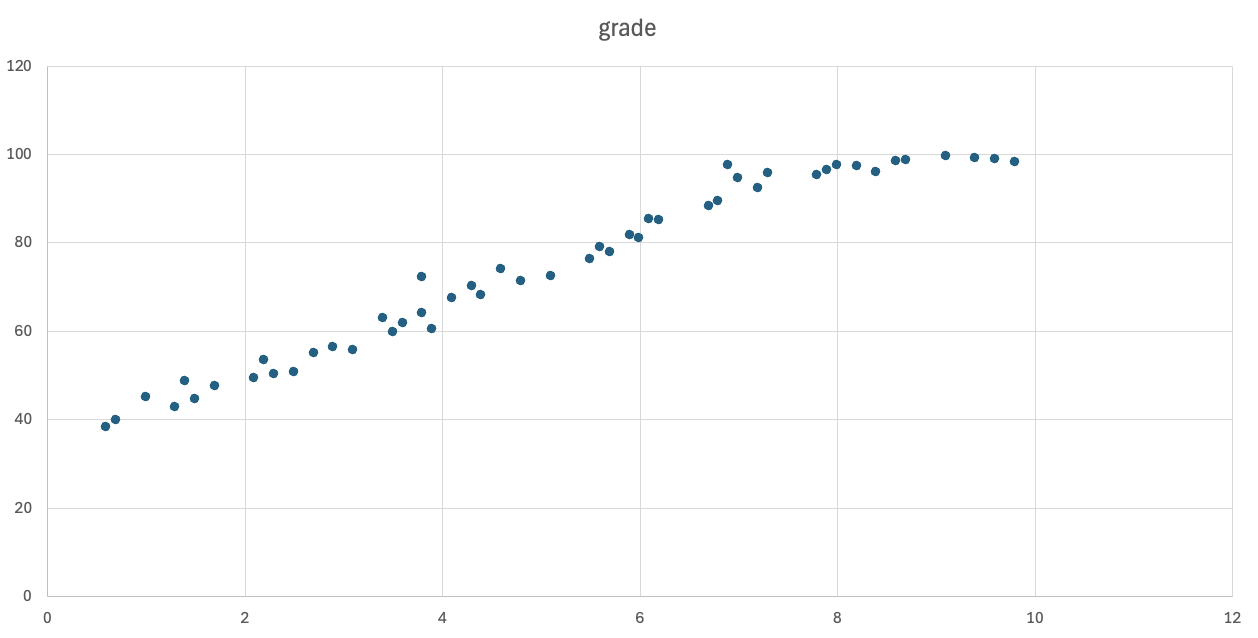
The graph above illustrates that the X-axis represents the number of hours a student dedicated to studying, while the Y-axis corresponds to their grade. A clear correlation between these two variables is prominent, providing an excellent opportunity for our program to learn from the data and make accurate predictions for future outcomes.
Finding the relationship between the independent variable (the number of hours) and the dependent variable (the grade) is called Regression. In this case, we can see that this regression is close to a straight line. In other words, this algorithm is called Linear Regression. We need to take these points and calculate the Linear function to use it.
Calculating our Linear function
In the machine-learning world, “Take these points” actually means the training phase. If we look at what a linear function looks like, it is from the form of:
Y = mx + bSo, eventually, we need to calculate the m and the b variables.
For m, we will do:
m=n∑(x2)−(∑(x))2n∑(xy)−∑(x)∑(y)
And for b:
b=n∑(y)−m∑(x)
Now, I assume you don’t have the strength to analyze these functions, so let’s translate them to Swift, which we care and love:
let n = Float(x.count)
let sumX = x.reduce(0, +)
let sumY = y.reduce(0, +)
let sumXY = zip(x, y).map(*).reduce(0, +)
let sumXSquare = x.map { $0 * $0 }.reduce(0, +)

let numeratorM = n * sumXY - sumX * sumY
let denominatorM = n * sumXSquare - (sumX * sumX)

guard denominatorM != 0 else { throw TrainingError.divisionByZero }

m = numeratorM / denominatorM
b = (sumY - m! * sumX) / n
The above code takes the complex calculations from the previous functions and performs them in Swift code.
In our case of the dataset, m = 7.37~ and b=36.21~.
Now that we have the m and the b variables let’s put this linear line on our graph:
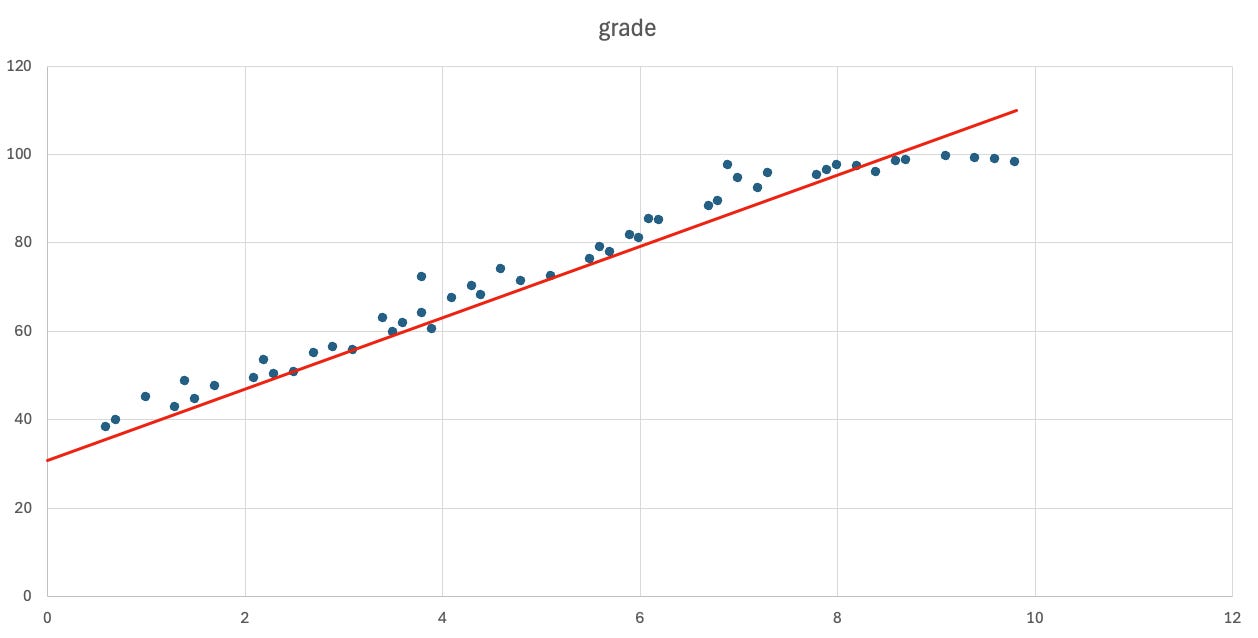
We can use this linear function to predict the student’s grade based on the number of hours they learned:
    func predict(x: Float) throws -> Float {
        guard let m, let b else { throw TrainingError.mAndBNotInitialized }
        return m * x + b
    }
The above code places the different values x,m, and b in our linear function to calculate the y.
Summary
Writing machine-learning code is much more complex than that, and in many datasets, the Simple Linear Algorithm won’t be suitable. However, this article seeks to give us a sense of a machine-learning algorithm that can be implemented using Swift. For more complex data sets, we can always use the Create ML framework and take advantage of on-device learning.
You can find the code for this article in this GitHub repository.
Originally published on Medium.
Comments